
Contact Us

Contact Us


    Microsoft Powerpoint Training Ottawa

    Microsoft PowerPoint online training courses

    A well-built presentation changes how your ideas land in any Ottawa boardroom or virtual meeting. PowerPoint gives you all the tools — slides, charts, animation, video, and more — but knowing how to use them well is what separates a polished deck from a forgettable one. Our course focuses on the techniques that actually make a difference.

    Where is it?

    Due to Covid-19, all courses
    are online in real time with
    a real instructor.

    What’s included

    • Free after-class support
    • Hands-on practice throughout
    • Course Certificate
    • Free retake policy

    Why choose us?

    • Small class sizes
    • Top instructors
    • Better practice exercises
    • Free after-class support
    • Money Back guarantee
    Training Ottawa - Money Back Guarantee
    Most classes are guaranteed to run. Training is available on your choice of Mac or PC.

    Microsoft PowerPoint – Basics
    1 Day | 6 hours | $325 PLUS TAX

    Prerequisite: None.

    A polished presentation starts with knowing your tools. This Ottawa course covers everything PowerPoint offers for building, editing, and sharing slide decks -- blank canvas to finished product, templates to custom themes. You'll finish with a complete presentation and the skills to build the next one significantly faster.

    Introduction

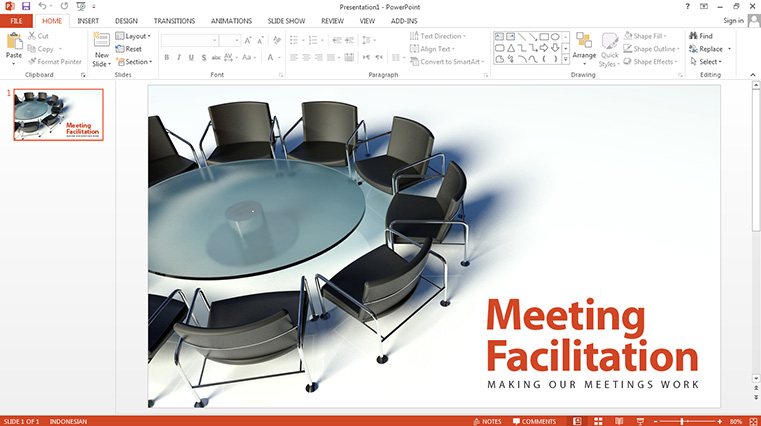
    • » the PowerPoint interface
    • » the Ribbon
    • » the Status bar
    • » changing views and adding guides

    Working with presentations

    • » creating a presentation from scratch
    • » creating a presentation from a template
    • » changing themes
    • » working with slide masters
    • » adding a header and footer
    • » using Backstage view

    Working with slides

    • » adding and removing slides
    • » changing the slide layout
    • » organizing slides into sections
    • » rearranging slides

    Adding pictures to slides

    • » adding pictures and clip art
    • » aligning objects using guides
    • » adding effects to pictures
    • » understanding object layering
    • » removing the background from pictures
    • » using the Eyedropper tool

    Adding content to slides»

    • » working with bullet points
    • » using Outline mode
    • » formatting text and creating WordArt
    • » working with text boxes
    • » creating and formatting tables
    • » inserting tables from Excel
    • » the research and thesaurus tools

    Adding shapes, diagrams, and charts

    • » adding shapes
    • » formatting shapes
    • » cropping a picture to a shape
    • » merging shapes to create your own graphics
    • » creating and formatting charts
    • » using SmartArt to create diagrams

    Adding video, audio, and animation

    • » adding and formatting video
    • » working with video clips
    • » working with audio files
    • » slide transitions
    • » adding animation to objects and text

    Preparing the presentation

    • » spell check
    • » adding speaker notes
    • » editing and printing handout masters
    • » rehearsing a presentation
    • » adding and viewing comments
    • » reviewing and comparing changes

    Delivering your presentation

    • » running a slideshow
    • » using Presenter view
    • » annotating and highlighting
    • » jumping to different sections

    Reusing and sharing presentations

    • » saving a custom theme
    • » saving a presentation as a template
    • » printing a presentation
    • » recording and narrating a slideshow
    • » saving your presentation as a video
    • » exporting the presentation as a pdf
    • » sending the presentation via email
    • » presenting live online
    • » packaging the presentation
    

    Dates

    • Online:
    • Jun 26
    • Jul 13
    • Aug 31
    • Sep 14

    What a great course! Roz was great at answering questions and taking time to stop and help. The exercises were perfect and now I’m spending much less time putting my presentations together. Susan N.

    Cancellation & Rescheduling Policy

    Plans change, and we can accommodate all reasonable requests. Sometimes there are hard costs
    involved but we’ll work with you to reduce or avoid them altogether. Please direct all cancellation
    and rescheduling emails to learning@thetrainingcompany.ca

    Cancellations

    » Cancellations made more than 5 days before a course date qualify for a full refund minus a $35 administration fee per student.

    » Cancellations made less than 5 days before a course do not qualify for a refund but the class may be rescheduled.

    » Cancellations made within 48 hours of the start time are not eligible for a refund and may not be rescheduled.

    » We are not able to offer refunds or rescheduling for no-shows or uncompleted courses.

    Rescheduling

    » There is no charge for rescheduling when you inform us at least 3 days before the course.

    » An administration fee of $35 per person is charged when rescheduling less than 3 days before a course.

    » Student substitutions are free. If you cannot take a course maybe your colleague can. Just let us know.

    » It is rare that classes do not run as scheduled but we do reserve the right to reschedule previously confirmed classes.