
Contact Us

Contact Us


    infographics image Training Ottawa

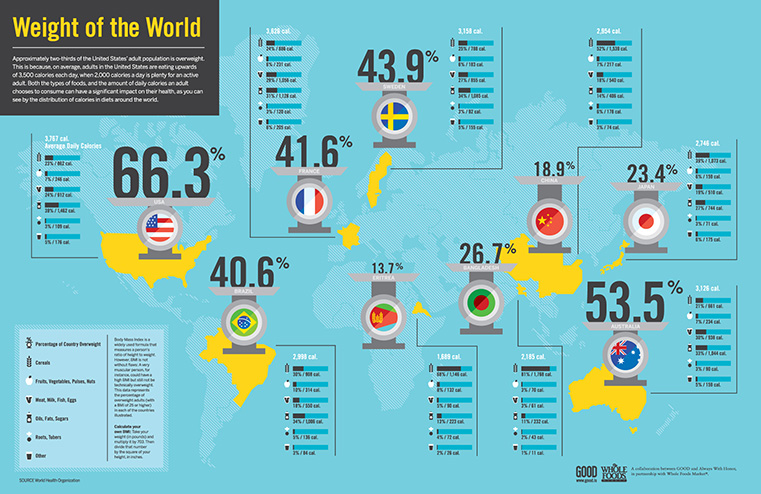
    Infographics online training course

    A great infographic communicates instantly what an Ottawa report or spreadsheet never could. This workshop teaches the complete process — finding the story in your data, choosing the right format, and building graphics that are accurate, clear, and visually compelling. Hands-on using Illustrator and Photoshop throughout.

    Where is it?

    Due to Covid-19, all courses
    are online in real time with
    a real instructor.

    What’s included

    • Free after-class support
    • Hands-on practice throughout
    • Course Certificate
    • Free retake policy

    Why choose us?

    • Best Online Classes Canada
    • Top Instructors
    • Better Practice Exercises
    • Online Training Course
    • Money Back Guarantee
    Training Ottawa - Money Back Guarantee
    Most classes are guaranteed to run. Training is available on your choice of Mac or PC.

    Infographics
    1 Day | 7 hours | $550 PLUS TAX

    Prerequisite: Adobe Illustrator 101 or equivalent experience.

    A well-made infographic communicates what a spreadsheet or report never could. This Ottawa workshop teaches the complete process -- finding the story in your data, choosing the right visual format, and building graphics that are accurate, clear, and genuinely compelling. Hands-on using Illustrator and Photoshop.

    Introduction

    • » round table
    • » what is an infographic?
    • » sample inforgraphics
    • » the good, the bad, the ugly
    • » infographic as marketing tool

    Getting started

    • » researching topics
    • » finding the best data
    • » looking at data from various angles
    • » finding the kernel of a story

    What type of infographic?

    • » common infographic styles
    • » choosing the appropriate type
    • » converting the data to graphics

    Telling the story

    • » structuring the narrative
    • » the core message
    • » attention grabbing headlines

    The design stage

    • » your audience
    • » brainstorming
    • » visualizing the data
    • » creating a mood board if necessary
    • » sketching ideas on paper
    • » selecting appropriate colours
    • » choosing the typeface(s)

    The tools

    • » using Illustrator
    • » advanced Illustrator concepts
    • » using Photoshop

    Saving and exporting

    • » what format?
    • » posting online
    • » should it be responsive?
    

    Dates

    • Online:
    • Jul 13
    • Aug 31
    • Sep 08
    • Oct 26
    • Nov 27

    Five stars. Really, this was super helpful. I learned stuff I will use right away. Kyle C.

    Cancellation & Rescheduling Policy

    Plans change, and we can accommodate all reasonable requests. Sometimes there are hard costs
    involved but we’ll work with you to reduce or avoid them altogether. Please direct all cancellation
    and rescheduling emails to learning@thetrainingcompany.ca

    Cancellations

    » Cancellations made more than 5 days before a course date qualify for a full refund minus a $35 administration fee per student.

    » Cancellations made less than 5 days before a course do not qualify for a refund but the class may be rescheduled.

    » Cancellations made within 48 hours of the start time are not eligible for a refund and may not be rescheduled.

    » We are not able to offer refunds or rescheduling for no-shows or uncompleted courses.

    Rescheduling

    » There is no charge for rescheduling when you inform us at least 3 days before the course.

    » An administration fee of $35 per person is charged when rescheduling less than 3 days before a course.

    » Student substitutions are free. If you cannot take a course maybe your colleague can. Just let us know.

    » It is rare that classes do not run as scheduled but we do reserve the right to reschedule previously confirmed classes.